
A rack is often treated as background equipment. In a small workspace, it can become the place where several different systems meet: a computer, video recording equipment, backup power and the cables connecting them.
One installation, several practical needs
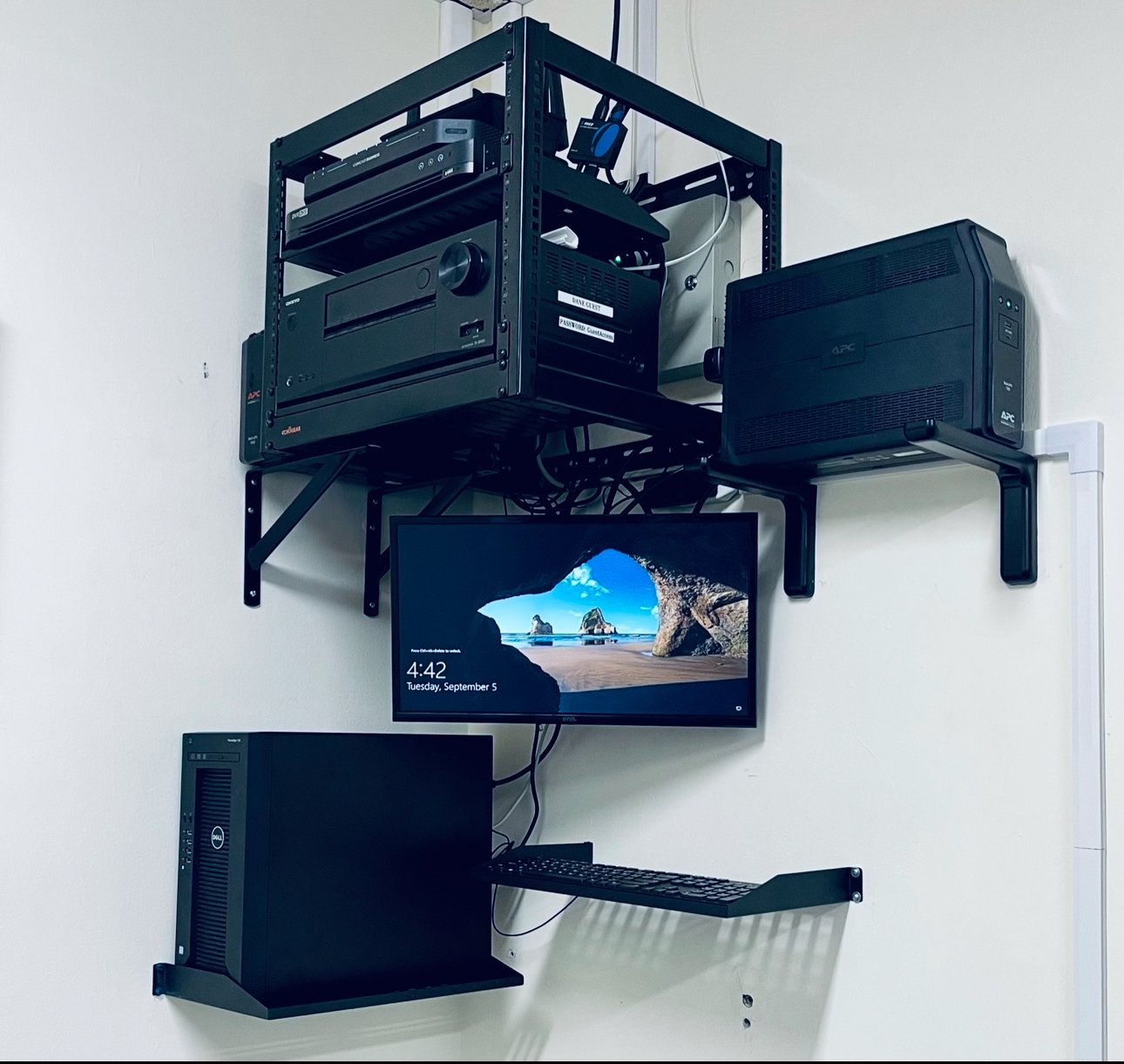
This example from our field-work portfolio shows a wall-mounted equipment rack, backup power units and a desktop workstation. The computer, monitor and keyboard are supported separately, keeping the setup off the floor while leaving the equipment visible and accessible.
Bringing devices into one area makes the relationships between them easier to follow. In this setup, the workstation remains usable below the rack instead of occupying the equipment shelves. That distinction matters when one space supports both daily work and technical equipment.
Organization is part of support
Equipment placement affects more than appearance. A technician needs to reach connections, see indicators and remove a device for service. Cables also need enough room to connect without being pulled tight or blocking access.
A tidy-looking rack is only one part of the job. For a business network, cable identification, patch-panel connections and testing should be considered alongside the physical mounting. The right arrangement depends on the equipment and the space available.
CypressPort provides network cabling and rack support for businesses in Fort Myers and surrounding Southwest Florida communities.
Planning a rack or workstation installation? Tell CypressPort about your equipment and space. Assistance is available in English and Spanish.